Manage enrolled laptops
Change who may sign in
To add or remove people, change the directory group; nothing to do on the laptops. To change the rules on an
enrolled laptop, use policy set. It needs no directory credentials and doesn't enroll again.
monarchy-identity policy show                                        # what's in force now
sudo monarchy-identity policy set --groups laptop-users,contractors  # also allow the contractors group
sudo monarchy-identity policy set --users alice,bob                  # only these people
sudo monarchy-identity policy set --sudo-groups laptop-admins        # this group gets sudo
sudo monarchy-identity policy set --sudo-groups -                    # nobody from the directory gets sudo
sudo monarchy-identity policy set --offline-days 14                  # cached sign-in expires after 14 days away
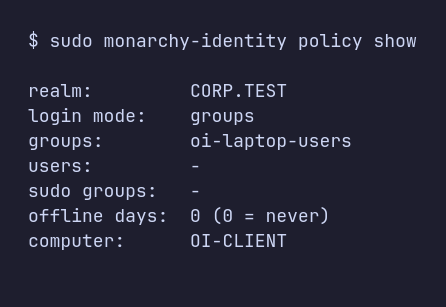
- Only what you pass changes. Everything else keeps its current value.
- Mistakes are refused. A group the directory doesn't have, or a change that would let nobody in, changes nothing.
- Offline is fine. The new policy applies now and takes effect for the directory once the laptop reconnects.
--sudo-groups gives members of those groups full sudo; group names may use letters, digits, ., _ and -.
Leave the directory
sudo monarchy-identity leave --admin joinuser
leave turns off directory sign-in and removes everything enrolling changed: the login theme, the autologin setting and
any sudo rule. Local accounts are untouched; directory users' home folders stay on disk. With the join account
(--admin), Active Directory also deletes the laptop's computer account; without it, the account stays in the directory
(details).
Uninstall
sudo pacman -R monarchy-identity
Removing the package from an enrolled laptop runs leave first (without directory credentials). Restart before anyone
signs in at the login screen again.